Ars Technica reports: Asus is first to the party with a #Thunderbolt 2-certified motherboard http://t.co/rMKiaE7FlD pic.twitter.com/xqw5sHB30R
— Synchrotech, Inc. (@synchrotech_inc) August 20, 2013
Showing posts with label Synchrotech. Show all posts
Showing posts with label Synchrotech. Show all posts
Tuesday, August 20, 2013
Ars Technica reports: Asus is first to the party with a Thunderbolt 2-certified motherboard


Tuesday, March 26, 2013
Using Synchrotech's X4SD USB 2.0 SD Card Reader Four (4) Slot for SD Card duplication
 Synchrotech's X4SD USB 2.0 SD Card Reader allows simultaneous access to four SD Card style media. In Automating X4SD USB 2.0 SD Card Reader Four (4) Slot Operations Synchrotech outlines several techniques for automating the copying of files to the device's multiple slots. Here we explore making exact binary copies of media using the device. A common use of this process is duplication.
There's various ways to do do device duplication or byte-for-byte copies of media. Whether we're duplicating CD-ROMs, hard drive disks, SRAM PC Cards, or other removable media, the Unix dd is frequently preferred for these types of operations. While we can execute card to card duplications from one X4SD slot to another, the most common use for the reader is to write an existing SD Card image to all four slots simultaneously. To that end we'll create a binary image of a master SD Card and then use that master to write to blank cards.
Creating an image of the SD Card
dd works with block devices, so we need to unmount the SD Card. To make this simple, we'll be using just one of the X4SD slots at this stage. We'll be using Mac OS X for our example and detail the difference for OpenBSD and Xubuntu. First, we need to identify the mount point of the inserted card. Calling mount in the terminal shows us the information we need (we're leaving out the rest of the output here).
/dev/disk1s1 on /Volumes/NO NAME (local, nodev, nosuid)
We use that information to unmount the mounted device.
[kyoto:~/Desktop] rds% sudo diskutil unmount /Volumes/NO\ NAME
Volume /Volumes/NO NAME unmounted
OpenBSD and Xubuntu would use umount /[devicepath]. Using the block device reference to the X4SD slot, we can copy the card to a binary file using dd.
[kyoto:~/Desktop] rds% sudo dd if=/dev/disk1s1 of=sdcard.bin
1951677+0 records in
1951677+0 records out
999258624 bytes transferred in 1203.276878 secs (830448 bytes/sec)
Writing the image to SD Cards
Inserting a new card into the X4SD, then unmounting it, we can create a duplicate of the original. We then test it using cmp to see if it is identical to the binary file.
[kyoto:~/Desktop] rds% sudo dd if=sdcard.bin of=/dev/disk1s1
1951677+0 records in
1951677+0 records out
999258624 bytes transferred in 1203.276878 secs (830448 bytes/sec)
[kyoto:~/Desktop] rds% cmp /dev/disk1s1 ~/Desktop/sdcard.bin
[kyoto:~/Desktop] rds%
Here we write to all four slots simultaneously on a Xubuntu machine. It's feasible that using hubs and multiple X4SD, we could write to more than four cards at once on a machine with enough CPUs/CPU cores. However, there's a practical limit to the amount of I/O operations one would want to run at the same time. Perhaps writing to each bank of cards sequentially would be the best practice? Since I was only provided a single test unit, that remains an academic question.
rds@okinawa-lin2:~$ sudo dd if=sdcard.bin of=/dev/sdc1 & \
&& dd if=sdcard.bin of=/dev/sdd1 & \
&& dd if=sdcard.bin of=/dev/sde1 & \
&& dd if=sdcard.bin of=/dev/sdf1 &

1951677+0 records in
1951677+0 records out
999258624 bytes (999 MB) copied, 270.799 s, 3.7 MB/s
1951677+0 records in
1951677+0 records out
999258624 bytes (999 MB) copied, 423.987 s, 2.4 MB/s
1951677+0 records in
1951677+0 records out
999258624 bytes (999 MB) copied, 775.1 s, 1.3 MB/s
1951677+0 records in
1951677+0 records out
999258624 bytes (999 MB) copied, 860.479 s, 1.2 MB/s
Appendices
Determining Media Paths
Here's the abridged results of running mount on our various test systems with the X4SD plugged in and all four of its slot occupied. This output will look different based on what's connected to an individual system.
OpenBSDsd0i on /mnt/s1 type msdos (local) sd1i on /mnt/s2 type msdos (local) sd2i on /mnt/s3 type msdos (local) sd3i on /mnt/s4 type msdos (local)Xubuntu Linux/dev/sdd1 on /media/BF2C-1214 type vfat (rw,nosuid,nodev,uid=1000,gid=1000,shortname=mixed,dmask=0077,utf8=1,showexec,flush,uhelper=udisks) /dev/sdf1 on /media/02A3-1214 type vfat (rw,nosuid,nodev,uid=1000,gid=1000,shortname=mixed,dmask=0077,utf8=1,showexec,flush,uhelper=udisks) /dev/sde1 on /media/3A3A-1214 type vfat (rw,nosuid,nodev,uid=1000,gid=1000,shortname=mixed,dmask=0077,utf8=1,showexec,flush,uhelper=udisks) /dev/sdc1 on /media/5AED-1214 type vfat (rw,nosuid,nodev,uid=1000,gid=1000,shortname=mixed,dmask=0077,utf8=1,showexec,flush,uhelper=udisks)Mac OS X/dev/disk2s1 on /Volumes/NO NAME 3 (local, nodev, nosuid) /dev/disk4s1 on /Volumes/NO NAME 2 (local, nodev, nosuid) /dev/disk3s1 on /Volumes/NO NAME (local, nodev, nosuid) /dev/disk1s1 on /Volumes/NO NAME 1 (local, nodev, nosuid)
My Test Systems
Here's the results of running uname -a on our various test systems.
OpenBSD okinawa-bsd2.my.domain 5.1 GENERIC.MP#207 amd64
Linux okinawa-lin2 3.2.0-39-generic #62-Ubuntu SMP Wed Feb 27 22:05:17 UTC 2013 i686 i686 i386 GNU/Linux
Darwin kyoto 8.11.0 Darwin Kernel Version 8.11.0: Wed Oct 10 18:26:00 PDT 2007; root:xnu-792.24.17~1/RELEASE_PPC Power Macintosh powerpc
Code example disclaimer
Technology Musings grants you a nonexclusive copyright license to use all programming code examples from which you can generate similar function tailored to your own specific needs.
All sample code is provided by Technology Musings for illustrative purposes only. These examples have not been thoroughly tested under all conditions. Technology Musings, therefore, cannot guarantee or imply reliability, serviceability, or function of these programs.
All programs contained herein are provided to you "AS IS" without any warranties of any kind. The implied warranties of non-infringement, merchantability and fitness for a particular purpose are expressly disclaimed.
Friday, September 2, 2011
Power Supply FAQ for FireWire Repeater Hubs including Unibrain's FireRepeater Line

A frequently asked question about FireWire repeater hubs is "do I need the optional power supply?" The answer to this question depends on the types of FireWire 800 or FireWire 400 devices are being used.
Quick Definitions: Self Powered vs. Bus Powered
Self Powered FireWire devices are ones that plug into the wall or utilizes internal batteries. One example is FireWire hard disk drives using 3.5in mechanism which come with their own power transformers and AC adapters. Another example are battery powered DV Camcorders. Most FireWire based audio equipment like those from Pro Tools is self powered as well
Bus Powered FireWire devices draw current from the FireWire bus itself. FireWire hard disk drives using 2.5in mechanisms are typically able to use bus power. Our CFFire800 Pro FireWire 800 UDMA CompactFlash reader requires bus power. Portable devices like the Apogee Duet require bus power as well.
If you are using self powered devices with a FireWire repeater hub, then there isn't a need to purchase an optional power supply. Conversely, if you are using bus powered FireWire products, you almost certainly need the optional power supply. [1]
Bus Power isn't always enough for multiple devices drawing current off multiple ports at the same time. If you daisy chain several devices, it also may draw more current than available. Further, the total amount of Amps a hub provides needs to divided by the number of ports to find per port current when each port is drawing current. In the case of Unibrain's FireRepeater 3A supply, this would work out approximately as follows:
- Unibrain FireRepeater-800 Pro FireWire 800 IEEE 1394b Repeater Hub 5 Port
- (3 amperes) / 5 = 0.6 amperes approximately per port (max)
- Unibrain FireRepeater-800 Pro FireWire 800 IEEE 1394b Repeater Hub 4 Port
- (3 amperes) / 4 = 0.75 amperes approximately per port (max)
- Unibrain FireRepeater 800 FireWire 800 IEEE 1394b Repeater Hub 3 Port
- (3 amperes) / 3 = 1 ampere approximately per port (max)
- Unibrain FireRepeater 400 FireWire 400 IEEE 1394a Repeater Hub 3 Port
- (3 amperes) / 3 = 1 ampere approximately per port (max)
Often computer companies will list ports by watts, instead of amps. When a company lists Watts for their FireWire ports, divide it by 12 (FireWire is typically 12 Volts) to find the Amperage.
The calculation above are the worst case scenario, typical application rarely see devices drawing current of each port.
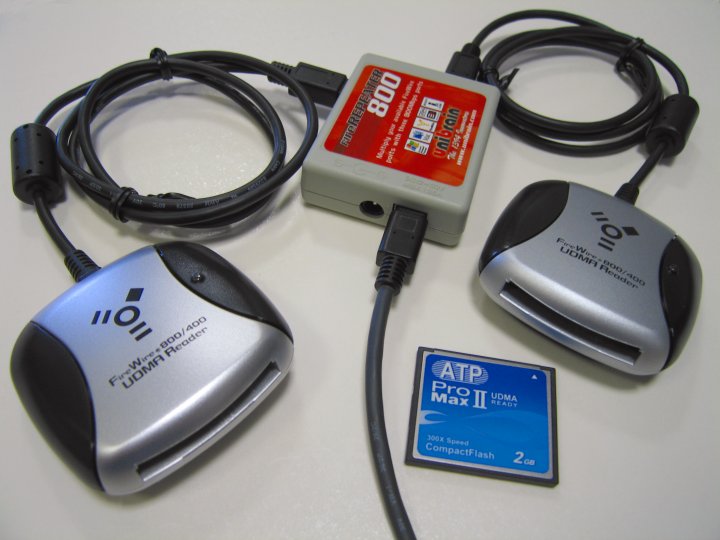
[1] A notible exception was the CFFire800 Pro FireWire 800 UDMA CompactFlash reader with Unibrain's 3 Port FireWire 800 Hub. We've tested this off a powered Mac port and were able to run two CFFire800 Pro's without the addtional power supply. Here is a quote from our test results.
While our CFFire800 Pro uses FireWire bus power, we knew it draws less than 500mA, while the MacBook Pro provides just under 1A of current while running on batteries. One product we offer, Unibrain's extremely portable FireRepeater 800, splits source current between two ports. With that in mind we set out to test two CFFire800 Pro readers with FireRepeater 800 to see if it provided enough power off a single FireWire 800 port to enable both CompactFlash readers; we found it worked flawlessly.
12VDC 3A External Power Supplies/Adapters for Unibrain FireWire Devices
This versatile adapter provides up to 3A stable regulated 12V DC output. For use with Unibrain Fire Repeaters, Fire-i Digital cameras and Unibrain FireWire External Hard Drives. It provides power for FireWire devices on laptops that do not provide power through the FireWire ports and can provide additional power for devices connected in an extended link to desktop systems.
- Part Number and Description
- PS-12VDC-UB 12VDC 3A External Power Supply/Adapter UB (FireWire)
- PS-12VDC-UB-EUROPE 12VDC 3A External Power Supply/Adapter UB (FireWire) for European Type C/F outlets
- Others available on special order, contact us with outlet type
Friday, October 30, 2009
Announcing EverythingHerePlus.com
 EverythingHerePlus.com is a new online shop that, among other things, is an authorized Synchrotech reseller.
 Their prices on many of Synchrotech's most popular items are typically discounted, and they ship via USPS Priority mail instead of FedEx, so many items are much cheaper to purchase when shipping is taken into account. For example EverythingHerePlus.com sells and ships the ExpressAdapt PCMCIA PC CardBus to USB Mode ExpressCard Adapter for $27.92. Or have an Unibrain FireWire 400 to 800 Adapter delivered for less the the retail price of the Sonnet version.
Subscribe to:
Posts (Atom)


