Showing posts with label PC Card. Show all posts

Sunday, March 20, 2011

Instructions for Unix-like Systems with Elan's U111-M SRAM and ATA Flash PCMCIA PC Card Drive

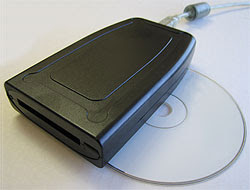
U111-M USB to PCMCIA PC Card ATA Flash and SRAM
EverythingHerePlus.com recently announced a first draft of a document which outlines the use of the BSD and Linux compatible USB reader for PCMCIA PC Card SRAM and ATA Flash memory devices. While the draft isn't complete, experienced users will have no problems using the command line instructions to complete tasks. They tested the device with OpenBSD and Xubuntu Linux.

Elan's U111-M PCMCIA PC Card reader for SRAM and ATA Flash memory devices is unique in that the reader itself brokers all the interfacing with the PC Card and presents itself to the host computer as a USB mass storage device. In addition to working on The Windows platforms, the device works with various versions of BSDs and Linux. Because of this, the U111-M allows users of Unix-like platforms to perform actions on these cards using common command line tools that usually require specialized and expensive software for The Windows. EverythingHerePlus hopes the document will be helpful to those wanting to deploy the U111-M with Unix-like systems.

Table of Contents
Introduction
Operating Systems uname -a results
Plugging in PC Card SRAM or ATA Flash
PC Card Partition Information
Mounting PC Card SRAM or ATA Flash
Unmount PC Card SRAM or ATA Flash
Formatting/Erasing PC Card SRAM or ATA Flash
Binary Image File to PC Card SRAM or ATA Flash
Binary Notes
Comparing Binary to PC Card SRAM
Manual Checksums Binary vs. PC Card SRAM or ATA Flash
View Hexadecimal of PC Card Memory Area (or Binary File Copies)

Friday, January 22, 2010

U111-M Q&A, Compatibility with Mac OS X? on EverythingHerePlus.com Store blog - Plus U111-M on OpenBSD and Linux updates!

The store blog from EverythingHerePlus.com answers questions regarding U111M compatibility with Mac OS X in Store EverythingHerePlus.com: U111-M Q&A, Compatibility with Mac OS X?. Of interest is the OpenBSD work around testing we did. U111M units with the most current firmware (1.05 above) work just fine with OpenBSD, with the exception of PCMCIA PC Card hot-swapping. As long as the card is inserted in the U111-M prior to connecting, the OpenBSD kernel recognizes it. In fact, there's no need to reboot between PCMCIA PC Card exchanges. Unplugging and plugging in the U111M on the USB bus is all that's necessary to recognize a new card.

Using OpenBSD, we were able to read, write, format, create binary images from, and write binary images to PCMCIA PC Card SRAM and ATA Flash. These capabilities, using just standard command line Unix utilities, are features once exclusively part of expensive, proprietary, Windows software packages. Now, using the U111-M with OpenBSD or Linux provides important low level features often needed with equipment from Honeywell, Canon, Epson, and others.

EverythingHerePlus.com will soon have detailed instructions for these operations.

Monday, January 18, 2010

U111-M USB to PC Card Read-Writer 1 Slot PCMCIA PC Card ATA Flash and SRAM Memory Cards

U111M USB reader for ATA Flash and SRAM PC CardsThe U111-M is an external read-writer for PCMCIA PC Card SRAM, and ATA Flash memory cards. The U111-M works without additional software or drivers on supported operating systems, treating both SRAM and ATA Flash as standard removable USB mass storage devices. Used in concert with a Type II PC Card adapter, the U111M USB to PCMCIA Memory PC Card drive will work with a variety of consumer memory cards including CompactFlash and SD Cards. Used with desktop or notebooks computers, the U111-M USB to PC Card Read-Writer 1 Slot PCMCIA PC Card ATA Flash and SRAM makes copying files to and from PCMCIA PC Card SRAM and PCMCIA PC Card ATA Flash devices simple and straight forward without confusing software interfaces.

PCMCIA System Architecture: 16-Bit PC Cards (2nd Edition)The U111-M comes with a USB 'Y' for use on rare systems with underpowered ports. Simply plug in the additional power only connection in order to provide necessary current. The U111M provides an inexpensive, hassle free solution to deploying legacy PCMCIA PC Card memory SRAM and ATA Flash cards on modern Linux and Windows computers with USB 1.1 or USB 2.0 ports.

Tuesday, November 3, 2009

U111-M testing results on Unix-like operating systems

U111-M USB to PCMCIA PC Card ATA Flash and SRAMEverythingHerePlus.com is now offering a Linux compatible USB reader for PCMCIA PC Card SRAM and ATA Flash memory devices just $155.00 USD. For full details check out U111-M USB to PCMCIA PC Card ATA Flash and SRAM.

In addition to testing the U111M with excellent results on the Windows XP platform, we were asked to test the U111-M with stable and secure Unix-like operating systems.

Here are the results.

Xubuntu Linux 9.04 (Jaunty Jackalope) amd64 edition
U111-M reader is recognized, both ATA Flash and SRAM worked without a hitch
OpenBSD 4.6 beta i386 edition
U111-M reader is recognized, kernel assigns sd0 dev on card inserts, but cannot mount cards using standard mount_msdos command line
OpenBSD UPDATE, this has been resolved -- please see this post for information on using the U111-M with OpenBSD
Mac OS X 10.4.11 PPC edition (iMac)
U111-M reader is recognized, but card inserts throw a "card not recognized" error dialog
Mac OS X 10.5.8 x86 edition (Mac Pro)
U111-M reader is recognized, but card inserts throw a "card not recognized" error dialog


The U111-M represents a low cost way to deploy both PCMCIA PC Card ATA Flash and SRAM on newer systems without existing PC Card slots. Its excellent compatibility with Linux is good news for users and the ability to deal with PCMCIA PC Card SRAM makes it unique in that regard. Xubuntu is the XFCE based Ubuntu distribution, and the U111-M really shined throughout the entire testing procedure.

Available at EverythingHerePlus.com at low prices with USPS Priority Mail shipping.

Thursday, October 2, 2008

Synchrotech's ExpressAdapt Shines on PowerBook G3 Pismo

ExpressAdaptOne of the advantages of working in the technology field is the opportunity to test new items. I recently was asked to test Synchrotech's ExpressAdapt product over a weekend with my PowerBook G3 (Pismo). The test application was an activated engineering sample of Option Wireless GT Max 3.6 Express. Synchrotech's ExpressAdapt was developed to handle mixed voltage ExpressCard better than competing devices, so getting the GT Max to work on an 8 year old notebook was actually possible.

The nicest thing about the ExpressAdapt CardBus to ExpressCard Adapter is it required absolutely no drivers under OS X (I am running Mac OS X 10.4.11). The system recognized when plugged in the PC Card slot without any hesitation. Locating software and configuration settings for the Option Wireless GT Max 3.6 Express was a little more work, but once done, the ExpressAdapt card allowed it to behave on the PowerBook G3 as if had been made for it. While 3G (HSDPA) wireless isn't all that fast, particularly in my neighborhood, it is nice to be able to try a technology in use on all the newer machines on an older Apple PowerBook. At $45, ExpressAdapt allows the use of any USB based ExpressCard in PC CardBus (32-bit) notebook slots.

On the same weekend, a friend dragged over his new notebook with The Vista, and his T-Mobile Wing and asked me to tether them. I found some instructions on the internet. I know the predatory monopoly capitalist is trying to re-market their failed OS, but just ten minutes of hands on showed me why people are rejecting it. It literally took more steps (various phishing notices, redirects, warnings, license agreement screens, more warnings, etc.) to download The Vista version of ActiveSync than it did to tether the phone. How people put up with such poorly thought out and executed software from Redmond is beyond me. I did get his system tethered and he was happy.