Showing posts with label Linux. Show all posts

Tuesday, June 11, 2013

EverythingHerePlus tests Delock's 91694 CompactFlash FireWire Reader with Xubuntu Linux

Delock FireWire 800 to UDMA CompactFlash Drive Read-Writer 91694Just in case no one has tested the Delock FireWire 800 CompactFlash reader under Linux, the good folks at EverythingHerePlus have. They write about it here and here. The CompactFlash cards they tested aren't of much interest for DSLR folks, so I won't post the actual benchmarks here. Those interested can check out the previous mentioned posts. They used the benchmarking feature of the linux app Disk Utility 3.0.2, and listed their test platform as follows.

  • Xubuntu 12.04.2 LTS
  • Intel Core2 6300 @ 1.86GHz with 2GB RAM

For older Linux systems without SuperSpeed USB 3.0, using FireWire 800 or even FireWire 400 is going to provide much better performance reading high end CompactFlash cards. The Delock 91694 FireWire CF CompactFlash Reader FireWire 800/IEEE 1394B is an excellent piece of hardware. I'll try to get them to test some higher speed CompactFlash on their setup soon.

Tuesday, March 26, 2013

Using Synchrotech's X4SD USB 2.0 SD Card Reader Four (4) Slot for SD Card duplication

X4SD USB 2.0 SD Card Reader Four SlotSynchrotech's X4SD USB 2.0 SD Card Reader allows simultaneous access to four SD Card style media. In Automating X4SD USB 2.0 SD Card Reader Four (4) Slot Operations Synchrotech outlines several techniques for automating the copying of files to the device's multiple slots. Here we explore making exact binary copies of media using the device. A common use of this process is duplication.

There's various ways to do do device duplication or byte-for-byte copies of media. Whether we're duplicating CD-ROMs, hard drive disks, SRAM PC Cards, or other removable media, the Unix dd is frequently preferred for these types of operations. While we can execute card to card duplications from one X4SD slot to another, the most common use for the reader is to write an existing SD Card image to all four slots simultaneously. To that end we'll create a binary image of a master SD Card and then use that master to write to blank cards.

Creating an image of the SD Card

dd works with block devices, so we need to unmount the SD Card. To make this simple, we'll be using just one of the X4SD slots at this stage. We'll be using Mac OS X for our example and detail the difference for OpenBSD and Xubuntu. First, we need to identify the mount point of the inserted card. Calling mount in the terminal shows us the information we need (we're leaving out the rest of the output here).

/dev/disk1s1 on /Volumes/NO NAME (local, nodev, nosuid)

We use that information to unmount the mounted device.

[kyoto:~/Desktop] rds% sudo diskutil unmount /Volumes/NO\ NAME
Volume /Volumes/NO NAME unmounted

OpenBSD and Xubuntu would use umount /[devicepath]. Using the block device reference to the X4SD slot, we can copy the card to a binary file using dd.

[kyoto:~/Desktop] rds% sudo dd if=/dev/disk1s1 of=sdcard.bin
1951677+0 records in
1951677+0 records out
999258624 bytes transferred in 1203.276878 secs (830448 bytes/sec)

Writing the image to SD Cards

Inserting a new card into the X4SD, then unmounting it, we can create a duplicate of the original. We then test it using cmp to see if it is identical to the binary file.

[kyoto:~/Desktop] rds% sudo dd if=sdcard.bin of=/dev/disk1s1
1951677+0 records in
1951677+0 records out
999258624 bytes transferred in 1203.276878 secs (830448 bytes/sec)
[kyoto:~/Desktop] rds% cmp /dev/disk1s1 ~/Desktop/sdcard.bin
[kyoto:~/Desktop] rds% 

Here we write to all four slots simultaneously on a Xubuntu machine. It's feasible that using hubs and multiple X4SD, we could write to more than four cards at once on a machine with enough CPUs/CPU cores. However, there's a practical limit to the amount of I/O operations one would want to run at the same time. Perhaps writing to each bank of cards sequentially would be the best practice? Since I was only provided a single test unit, that remains an academic question.

rds@okinawa-lin2:~$ sudo dd if=sdcard.bin of=/dev/sdc1 & \
&& dd if=sdcard.bin of=/dev/sdd1 & \
&& dd if=sdcard.bin of=/dev/sde1 & \
&& dd if=sdcard.bin of=/dev/sdf1 &

1951677+0 records in
1951677+0 records out
999258624 bytes (999 MB) copied, 270.799 s, 3.7 MB/s
1951677+0 records in
1951677+0 records out
999258624 bytes (999 MB) copied, 423.987 s, 2.4 MB/s
1951677+0 records in
1951677+0 records out
999258624 bytes (999 MB) copied, 775.1 s, 1.3 MB/s
1951677+0 records in
1951677+0 records out
999258624 bytes (999 MB) copied, 860.479 s, 1.2 MB/s

Appendices

Determining Media Paths

Here's the abridged results of running mount on our various test systems with the X4SD plugged in and all four of its slot occupied. This output will look different based on what's connected to an individual system.

OpenBSD
sd0i on /mnt/s1 type msdos (local)
sd1i on /mnt/s2 type msdos (local)
sd2i on /mnt/s3 type msdos (local)
sd3i on /mnt/s4 type msdos (local)

Xubuntu Linux
/dev/sdd1 on /media/BF2C-1214 type vfat (rw,nosuid,nodev,uid=1000,gid=1000,shortname=mixed,dmask=0077,utf8=1,showexec,flush,uhelper=udisks)
/dev/sdf1 on /media/02A3-1214 type vfat (rw,nosuid,nodev,uid=1000,gid=1000,shortname=mixed,dmask=0077,utf8=1,showexec,flush,uhelper=udisks)
/dev/sde1 on /media/3A3A-1214 type vfat (rw,nosuid,nodev,uid=1000,gid=1000,shortname=mixed,dmask=0077,utf8=1,showexec,flush,uhelper=udisks)
/dev/sdc1 on /media/5AED-1214 type vfat (rw,nosuid,nodev,uid=1000,gid=1000,shortname=mixed,dmask=0077,utf8=1,showexec,flush,uhelper=udisks)

Mac OS X
/dev/disk2s1 on /Volumes/NO NAME 3 (local, nodev, nosuid)
/dev/disk4s1 on /Volumes/NO NAME 2 (local, nodev, nosuid)
/dev/disk3s1 on /Volumes/NO NAME (local, nodev, nosuid)
/dev/disk1s1 on /Volumes/NO NAME 1 (local, nodev, nosuid)

My Test Systems

Here's the results of running uname -a on our various test systems.

OpenBSD okinawa-bsd2.my.domain 5.1 GENERIC.MP#207 amd64
Linux okinawa-lin2 3.2.0-39-generic #62-Ubuntu SMP Wed Feb 27 22:05:17 UTC 2013 i686 i686 i386 GNU/Linux
Darwin kyoto 8.11.0 Darwin Kernel Version 8.11.0: Wed Oct 10 18:26:00 PDT 2007; root:xnu-792.24.17~1/RELEASE_PPC Power Macintosh powerpc

Code example disclaimer

Technology Musings grants you a nonexclusive copyright license to use all programming code examples from which you can generate similar function tailored to your own specific needs.

All sample code is provided by Technology Musings for illustrative purposes only. These examples have not been thoroughly tested under all conditions. Technology Musings, therefore, cannot guarantee or imply reliability, serviceability, or function of these programs.

All programs contained herein are provided to you "AS IS" without any warranties of any kind. The implied warranties of non-infringement, merchantability and fitness for a particular purpose are expressly disclaimed.

Sunday, March 20, 2011

Instructions for Unix-like Systems with Elan's U111-M SRAM and ATA Flash PCMCIA PC Card Drive

U111-M USB to PCMCIA PC Card ATA Flash and SRAM
EverythingHerePlus.com recently announced a first draft of a document which outlines the use of the BSD and Linux compatible USB reader for PCMCIA PC Card SRAM and ATA Flash memory devices. While the draft isn't complete, experienced users will have no problems using the command line instructions to complete tasks. They tested the device with OpenBSD and Xubuntu Linux.

Elan's U111-M PCMCIA PC Card reader for SRAM and ATA Flash memory devices is unique in that the reader itself brokers all the interfacing with the PC Card and presents itself to the host computer as a USB mass storage device. In addition to working on The Windows platforms, the device works with various versions of BSDs and Linux. Because of this, the U111-M allows users of Unix-like platforms to perform actions on these cards using common command line tools that usually require specialized and expensive software for The Windows. EverythingHerePlus hopes the document will be helpful to those wanting to deploy the U111-M with Unix-like systems.

Table of Contents
Introduction
Operating Systems uname -a results
Plugging in PC Card SRAM or ATA Flash
PC Card Partition Information
Mounting PC Card SRAM or ATA Flash
Unmount PC Card SRAM or ATA Flash
Formatting/Erasing PC Card SRAM or ATA Flash
Binary Image File to PC Card SRAM or ATA Flash
Binary Notes
Comparing Binary to PC Card SRAM
Manual Checksums Binary vs. PC Card SRAM or ATA Flash
View Hexadecimal of PC Card Memory Area (or Binary File Copies)

Monday, September 6, 2010

FireRepeater resources

FireRepeater-800 Pro FireWire 800 IEEE 1394b Repeater Hub 4 PortThe folks at EverythingHerePlus have been busy as of late. One of the more important piece they've put together is Power Supply Information for FireWire Repeater Hubs like Unibrain's FireRepeater Line, which takes all the mystery out of when and why one would need a power supply for a FireWire repeater hub. The information is especially valuable for those using FireRepeater-800 PRO and FireRepeater-400 products.

Along with that, they make brief mention in Store News for EverythingHerePlus.com: FireRepeater-800 PRO gets a glowing review from IT Enquirer, of an excellent review which discusses the FireRepeater-800 PRO Four Port. An excerpt:

In contrast to its competitors, Unibrain’s FireRepeater-800 PRO has a wall mounting bracket to secure the unit in place, and the ability to screw-lock your FireWire cables in place. I would recommend the Unibrain FireRepeater-800 PRO to anyone wanting to connect more devices to his computer than he can daisy-chain, and up to a longer distance than is possible without a repeater device.

Given their breadth of FireWire knowledge and glowing customer reviews, you'd be hard pressed to find a better place to purchase FireWire products.

Friday, January 22, 2010

U111-M Q&A, Compatibility with Mac OS X? on EverythingHerePlus.com Store blog - Plus U111-M on OpenBSD and Linux updates!

The store blog from EverythingHerePlus.com answers questions regarding U111M compatibility with Mac OS X in Store EverythingHerePlus.com: U111-M Q&A, Compatibility with Mac OS X?. Of interest is the OpenBSD work around testing we did. U111M units with the most current firmware (1.05 above) work just fine with OpenBSD, with the exception of PCMCIA PC Card hot-swapping. As long as the card is inserted in the U111-M prior to connecting, the OpenBSD kernel recognizes it. In fact, there's no need to reboot between PCMCIA PC Card exchanges. Unplugging and plugging in the U111M on the USB bus is all that's necessary to recognize a new card.

Using OpenBSD, we were able to read, write, format, create binary images from, and write binary images to PCMCIA PC Card SRAM and ATA Flash. These capabilities, using just standard command line Unix utilities, are features once exclusively part of expensive, proprietary, Windows software packages. Now, using the U111-M with OpenBSD or Linux provides important low level features often needed with equipment from Honeywell, Canon, Epson, and others.

EverythingHerePlus.com will soon have detailed instructions for these operations.

Monday, January 18, 2010

U111-M USB to PC Card Read-Writer 1 Slot PCMCIA PC Card ATA Flash and SRAM Memory Cards

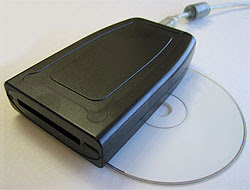
U111M USB reader for ATA Flash and SRAM PC CardsThe U111-M is an external read-writer for PCMCIA PC Card SRAM, and ATA Flash memory cards. The U111-M works without additional software or drivers on supported operating systems, treating both SRAM and ATA Flash as standard removable USB mass storage devices. Used in concert with a Type II PC Card adapter, the U111M USB to PCMCIA Memory PC Card drive will work with a variety of consumer memory cards including CompactFlash and SD Cards. Used with desktop or notebooks computers, the U111-M USB to PC Card Read-Writer 1 Slot PCMCIA PC Card ATA Flash and SRAM makes copying files to and from PCMCIA PC Card SRAM and PCMCIA PC Card ATA Flash devices simple and straight forward without confusing software interfaces.

PCMCIA System Architecture: 16-Bit PC Cards (2nd Edition)The U111-M comes with a USB 'Y' for use on rare systems with underpowered ports. Simply plug in the additional power only connection in order to provide necessary current. The U111M provides an inexpensive, hassle free solution to deploying legacy PCMCIA PC Card memory SRAM and ATA Flash cards on modern Linux and Windows computers with USB 1.1 or USB 2.0 ports.

Saturday, January 2, 2010

FireWire 800 Hubs for New iMacs and Macs as easy as 3, 4, 5!

EverythingHerePlus.com offers 3, 4, and 5 port FireWire 800 Repeater Hubs.The recent transition to 9-pin FireWire 800 across Apple's product line has many people scrambling to find FireWire 800 hubs. Not to worry, EverythingHerePlus.com offers 3, 4, and 5 port FireWire 800 Repeater Hubs. Great for new Macs, iMacs, and other computing environments utilizing high performance FireWire 800 peripherals.

FireWire 800's sustained performance, coupled with other advantages like long cable runs, the ability to daisy chain, and more, make it one of the best and most versatile standards. With a theoretical maximum throughput of 800Mbps, FireWire 800—also known as IEEE 1394b, can typically deliver 80MBps (megabytes per second) performance when used with high end external hard drives like those by G|Tech.

FireWire is a true peer-to-peer technology, unlike the prosaic USB standard. Connectivity terminology for FireWire 800 Repeater Hubs is a little different than those that use star topologies exclusively. The count on a FireWire 800 Repeater Hub comprises the total available ports, since a host computer is considered another peer level device. In other words, plugging a computer into a five port FireWire 800 Repeater Hub leaves four available ports left.

These five, four, and three port FireWire 800 hubs are great for the new Mac Pro, MacBook Pro, iMac and other computers deploying FireWire 800. The 3 port FireWire 800 Repeater Hub edition is a highly portable plastic model, great for traveling. The 4 port and 5 port FireWire 800 Repeater Hub models are constructed from sturdy aluminum and are great for studio and industrial applications. All three FireWire 800 Repeater Hubs accept the optional (purchased separately) PS-12VDC-UB 12VDC 3A External Power Supply to power devices that run off bus power.

Using 6-pin to 9-pin cables or FireWire cable adapters allow FireWire 800 hubs to work with FireWire 400 device of both the 6-pin and 4-pin variety. In fact, since FireWire 800 is backward compatible, investing in a FireWire 800 Repeater Hub for use in mixed FireWire 800 and FireWire 400 environments is the higher performance, and more economical choice.

5 Port FireWire 800 Repeater Hub at EverythingHerePlus.com
Unibrain FireRepeater-800 Pro FireWire 800 IEEE 1394b Repeater Hub 5 Port
2504 / FW8-FIO-UB5PRH Available with $5 USPS Priority Mail shipping!

4 Port FireWire 800 Repeater Hub at EverythingHerePlus.com
Unibrain FireRepeater-800 Pro FireWire 800 IEEE 1394b Repeater Hub 4 Port
2502 / FW8-FIO-UB4PRH Available with $5 USPS Priority Mail shipping!

3 Port FireWire 800 Repeater Hub at EverythingHerePlus.com
Unibrain FireRepeater 800 FireWire 800 IEEE 1394b Repeater Hub 3 Port
2501 / FW8-FIO-UB3PRH Available with $5 USPS Priority Mail shipping!

EverythingHerePlus.com is fun place to shop for fashion accessories, electronics, books, music, and more!

Tuesday, November 3, 2009

U111-M testing results on Unix-like operating systems

U111-M USB to PCMCIA PC Card ATA Flash and SRAMEverythingHerePlus.com is now offering a Linux compatible USB reader for PCMCIA PC Card SRAM and ATA Flash memory devices just $155.00 USD. For full details check out U111-M USB to PCMCIA PC Card ATA Flash and SRAM.

In addition to testing the U111M with excellent results on the Windows XP platform, we were asked to test the U111-M with stable and secure Unix-like operating systems.

Here are the results.

Xubuntu Linux 9.04 (Jaunty Jackalope) amd64 edition
U111-M reader is recognized, both ATA Flash and SRAM worked without a hitch
OpenBSD 4.6 beta i386 edition
U111-M reader is recognized, kernel assigns sd0 dev on card inserts, but cannot mount cards using standard mount_msdos command line
OpenBSD UPDATE, this has been resolved -- please see this post for information on using the U111-M with OpenBSD
Mac OS X 10.4.11 PPC edition (iMac)
U111-M reader is recognized, but card inserts throw a "card not recognized" error dialog
Mac OS X 10.5.8 x86 edition (Mac Pro)
U111-M reader is recognized, but card inserts throw a "card not recognized" error dialog


The U111-M represents a low cost way to deploy both PCMCIA PC Card ATA Flash and SRAM on newer systems without existing PC Card slots. Its excellent compatibility with Linux is good news for users and the ability to deal with PCMCIA PC Card SRAM makes it unique in that regard. Xubuntu is the XFCE based Ubuntu distribution, and the U111-M really shined throughout the entire testing procedure.

Available at EverythingHerePlus.com at low prices with USPS Priority Mail shipping.