 Got a loaner M-510 Portable Bluetooth A2DP Music Receiver to test out over the weekend. We plugged it into a Bose Wave II Radio using the included double male 3.5mm stereo audio cable. Our test devices were an iPhone 3GS and an iPad with Retina display (4th generation). Both devices were running iOS 6.1.3. Getting the M-510 to work with iOS devices was a snap, and the sound quality was surprisingly good for typical mobile device playback.
The M-510 Portable Bluetooth A2DP Music Receiver supports the Bluetooth Advanced Audio Distribution Profile (A2DP) utilizing Low Complexity Subband Coding (SBC). SBC is applied to existing audio CODECs, in other words transcoding on the fly. This is fine for typical medium to higher quality AAC and MP3 stored on portable devices like iPods, iPhones, and iPads. However, if you're expecting lossless formats like FLAC, ALAC, or even high quality lossy formats like lame --preset insane encoded files to sound the same, they won't. Highest quality audio is better served over WiFi with AirTunes/AirPlay enabled audio equipment. That said, the M-510's quality is acceptable for 256 kbps or lower quality iTunes AACs or MP3 files, which is what most people have on iDevices and other portable players. Overall the M-510 is an inexpensive way to add wireless playback ability to devices without that capability. If you're looking for really high fidelity, you're not shopping the under $40 devices market to begin with.
The M-510 Portable Bluetooth A2DP Music Receiver's other big plus is that it provides the choice between an AC adapter and running off a single AAA battery. That last option provides a lot of flexibility when you think of portable scenarios. Don't want to lug your expensive audio equipment outside, but have an old boombox with a 3.5mm line in? Add the M-510 and now that boombox becomes remote speakers for your iPhone 5.
Pairing the M-510 with the iOS devices is a simple as visiting Settings > Bluetooth" and then finding Music Receiver in the list of devices

Tap on Music Receiver and it will then read as Connected.
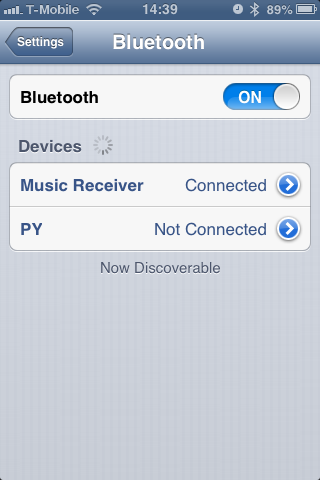
Later if you choose to remove the saved connection by clicking arrow to the right of the word Music Receiver and then tapping Forget this Device.

During playback, clicking the AirPlay icon on the bottom right of the screen (in orange next to the volume control) allows choice of where the audio signal is to be sent.

Here the M-510 is selected. We can easily switch to the iPhone's internal speakers by clicking the iPhone button.


