EverythingHerePlus posted a brief howto format PCMCIA ATA Flash PC Cards as FAT-16.
Showing posts with label ATA Flash. Show all posts
Friday, April 20, 2018
EHP FAQ: Formatting PCMCIA ATA Flash PC Cards as FAT-16
Labels:
ATA Flash,
EverythingHerePlus,
memory cards,
PC Card,
PCMCIA
Sunday, March 20, 2011
Instructions for Unix-like Systems with Elan's U111-M SRAM and ATA Flash PCMCIA PC Card Drive

EverythingHerePlus.com recently announced a first draft of a document which outlines the use of the BSD and Linux compatible USB reader for PCMCIA PC Card SRAM and ATA Flash memory devices. While the draft isn't complete, experienced users will have no problems using the command line instructions to complete tasks. They tested the device with OpenBSD and Xubuntu Linux.
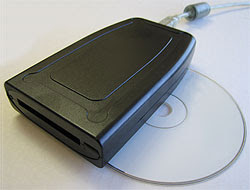
Elan's U111-M PCMCIA PC Card reader for SRAM and ATA Flash memory devices is unique in that the reader itself brokers all the interfacing with the PC Card and presents itself to the host computer as a USB mass storage device. In addition to working on The Windows platforms, the device works with various versions of BSDs and Linux. Because of this, the U111-M allows users of Unix-like platforms to perform actions on these cards using common command line tools that usually require specialized and expensive software for The Windows. EverythingHerePlus hopes the document will be helpful to those wanting to deploy the U111-M with Unix-like systems.
Table of Contents
Introduction
Operating Systems uname -a results
Plugging in PC Card SRAM or ATA Flash
PC Card Partition Information
Mounting PC Card SRAM or ATA Flash
Unmount PC Card SRAM or ATA Flash
Formatting/Erasing PC Card SRAM or ATA Flash
Binary Image File to PC Card SRAM or ATA Flash
Binary Notes
Comparing Binary to PC Card SRAM
Manual Checksums Binary vs. PC Card SRAM or ATA Flash
View Hexadecimal of PC Card Memory Area (or Binary File Copies)
Friday, January 22, 2010
U111-M Q&A, Compatibility with Mac OS X? on EverythingHerePlus.com Store blog - Plus U111-M on OpenBSD and Linux updates!
The store blog from EverythingHerePlus.com answers questions regarding U111M compatibility with Mac OS X in Store EverythingHerePlus.com: U111-M Q&A, Compatibility with Mac OS X?. Of interest is the OpenBSD work around testing we did. U111M units with the most current firmware (1.05 above) work just fine with OpenBSD, with the exception of PCMCIA PC Card hot-swapping. As long as the card is inserted in the U111-M prior to connecting, the OpenBSD kernel recognizes it. In fact, there's no need to reboot between PCMCIA PC Card exchanges. Unplugging and plugging in the U111M on the USB bus is all that's necessary to recognize a new card.
Using OpenBSD, we were able to read, write, format, create binary images from, and write binary images to PCMCIA PC Card SRAM and ATA Flash. These capabilities, using just standard command line Unix utilities, are features once exclusively part of expensive, proprietary, Windows software packages. Now, using the U111-M with OpenBSD or Linux provides important low level features often needed with equipment from Honeywell, Canon, Epson, and others.
EverythingHerePlus.com will soon have detailed instructions for these operations.
Using OpenBSD, we were able to read, write, format, create binary images from, and write binary images to PCMCIA PC Card SRAM and ATA Flash. These capabilities, using just standard command line Unix utilities, are features once exclusively part of expensive, proprietary, Windows software packages. Now, using the U111-M with OpenBSD or Linux provides important low level features often needed with equipment from Honeywell, Canon, Epson, and others.
EverythingHerePlus.com will soon have detailed instructions for these operations.
Monday, January 18, 2010
U111-M USB to PC Card Read-Writer 1 Slot PCMCIA PC Card ATA Flash and SRAM Memory Cards
The U111-M is an external read-writer for PCMCIA PC Card SRAM, and ATA Flash memory cards. The U111-M works without additional software or drivers on supported operating systems, treating both SRAM and ATA Flash as standard removable USB mass storage devices. Used in concert with a Type II PC Card adapter, the U111M USB to PCMCIA Memory PC Card drive will work with a variety of consumer memory cards including CompactFlash and SD Cards. Used with desktop or notebooks computers, the U111-M USB to PC Card Read-Writer 1 Slot PCMCIA PC Card ATA Flash and SRAM makes copying files to and from PCMCIA PC Card SRAM and PCMCIA PC Card ATA Flash devices simple and straight forward without confusing software interfaces.
Subscribe to:
Posts (Atom)

