Showing posts with label FireWire. Show all posts

Friday, December 1, 2017

FireWire 800 CompactFlash Reader and macOS High Sierra (10.13+) Delock 91694

We tested the Delock 91694 FireWire 800 CompactFlash Reader under macOS High Sierra (10.13.1). The Delock's 91694 FireWire 800 Reader worked flawlessly, mounting a SanDisk Extreme® CompactFlash 60MB/s UDMA 16GB cards, and a Transcend 4GB 133X card.

Under 10.4 through 10.9 iPhoto opened automatically when the reader was connected or when new CompactFlash cards were inserted. macOS High Sierra is the fourth macOS version to deploy the Photos app, which does not automatically launch. However, when we opened Photos and navigated to the "File > Import…" function, the CompactFlash card present in the reader was there and ready for importing with the preview feature.

The speedy Delock 91694 FireWire 800 CompactFlash Reader worked well under macOS High Sierra (10.13.1). Here's screen shots of the PCM-CR-FW81ECF-03 / 91694 working under macOS High Sierra (10.13.1). Our MacBook Pro has a FireWire 800 port and a Thunderbolt port.


Tuesday, June 11, 2013

EverythingHerePlus tests Delock's 91694 CompactFlash FireWire Reader with Xubuntu Linux

Delock FireWire 800 to UDMA CompactFlash Drive Read-Writer 91694Just in case no one has tested the Delock FireWire 800 CompactFlash reader under Linux, the good folks at EverythingHerePlus have. They write about it here and here. The CompactFlash cards they tested aren't of much interest for DSLR folks, so I won't post the actual benchmarks here. Those interested can check out the previous mentioned posts. They used the benchmarking feature of the linux app Disk Utility 3.0.2, and listed their test platform as follows.

  • Xubuntu 12.04.2 LTS
  • Intel Core2 6300 @ 1.86GHz with 2GB RAM

For older Linux systems without SuperSpeed USB 3.0, using FireWire 800 or even FireWire 400 is going to provide much better performance reading high end CompactFlash cards. The Delock 91694 FireWire CF CompactFlash Reader FireWire 800/IEEE 1394B is an excellent piece of hardware. I'll try to get them to test some higher speed CompactFlash on their setup soon.

Wednesday, May 1, 2013

Delock FireWire 800 to CompactFlash UDMA Drive Read-Writer 91694

I got to spend several days testing the Delock FireWire 800 to CompactFlash Reader. It worked spectacularly with the 16GB Sandisk Extreme 60MB/S UDMA CompactFlash cards that I use in my Canon 7D. I'll be posting benchmarks here soon.

Delock FireWire 800 to CompactFlash UDMA Drive Read-Writer 91694

The Delock FireWire 800 to UDMA CompactFlash Drive Read-Writer is a must for pro photographers and other demanding users of high speed CompactFlash memory cards. Capable of exploiting the high speeds of the latest generation of CompactFlash memory cards, the FireWire readers 800 boasts incredible read speeds. The Delock FireWire 800 to UDMA CompactFlash Drive reader supports all the recent high-speed CompactFlash standards including PIO Modes 0-4, DMA Modes 0-2, and UDMA Modes 0-6. it features a single CompactFlash slot for CompactFlash Type I and II including Hitachi Microdrives and other CFII+ rotating media. It supports FireWire 800 (and 400 with and optionally purchased adapter or cable) connectivity on both Macintosh and Windows Operating Systems. The FireWire 800 to CompactFlash uses FireWire bus power, so the CFFire800 reader plugs and plays with no external AC power. The Delock FireWire 800 to CompactFlash Drive requires no drivers and comes with a one year limited warranty.

Friday, September 2, 2011

Power Supply FAQ for FireWire Repeater Hubs including Unibrain's FireRepeater Line

12VDC 3A External Power Supplies/Adapters for Unibrain FireWire Devices)
A frequently asked question about FireWire repeater hubs is "do I need the optional power supply?" The answer to this question depends on the types of FireWire 800 or FireWire 400 devices are being used.

Quick Definitions: Self Powered vs. Bus Powered

Self Powered FireWire devices are ones that plug into the wall or utilizes internal batteries. One example is FireWire hard disk drives using 3.5in mechanism which come with their own power transformers and AC adapters. Another example are battery powered DV Camcorders. Most FireWire based audio equipment like those from Pro Tools is self powered as well

Bus Powered FireWire devices draw current from the FireWire bus itself. FireWire hard disk drives using 2.5in mechanisms are typically able to use bus power. Our CFFire800 Pro FireWire 800 UDMA CompactFlash reader requires bus power. Portable devices like the Apogee Duet require bus power as well.

If you are using self powered devices with a FireWire repeater hub, then there isn't a need to purchase an optional power supply. Conversely, if you are using bus powered FireWire products, you almost certainly need the optional power supply. [1]

Bus Power isn't always enough for multiple devices drawing current off multiple ports at the same time. If you daisy chain several devices, it also may draw more current than available. Further, the total amount of Amps a hub provides needs to divided by the number of ports to find per port current when each port is drawing current. In the case of Unibrain's FireRepeater 3A supply, this would work out approximately as follows:

Unibrain FireRepeater-800 Pro FireWire 800 IEEE 1394b Repeater Hub 5 Port
(3 amperes) / 5 = 0.6 amperes approximately per port (max)
Unibrain FireRepeater-800 Pro FireWire 800 IEEE 1394b Repeater Hub 4 Port
(3 amperes) / 4 = 0.75 amperes approximately per port (max)
Unibrain FireRepeater 800 FireWire 800 IEEE 1394b Repeater Hub 3 Port
(3 amperes) / 3 = 1 ampere approximately per port (max)
Unibrain FireRepeater 400 FireWire 400 IEEE 1394a Repeater Hub 3 Port
(3 amperes) / 3 = 1 ampere approximately per port (max)

Often computer companies will list ports by watts, instead of amps. When a company lists Watts for their FireWire ports, divide it by 12 (FireWire is typically 12 Volts) to find the Amperage.

The calculation above are the worst case scenario, typical application rarely see devices drawing current of each port.

Unibrain 3 port hub for 2 CFFire800 Pro FireWire 800 to UDMA CompactFlash Drives
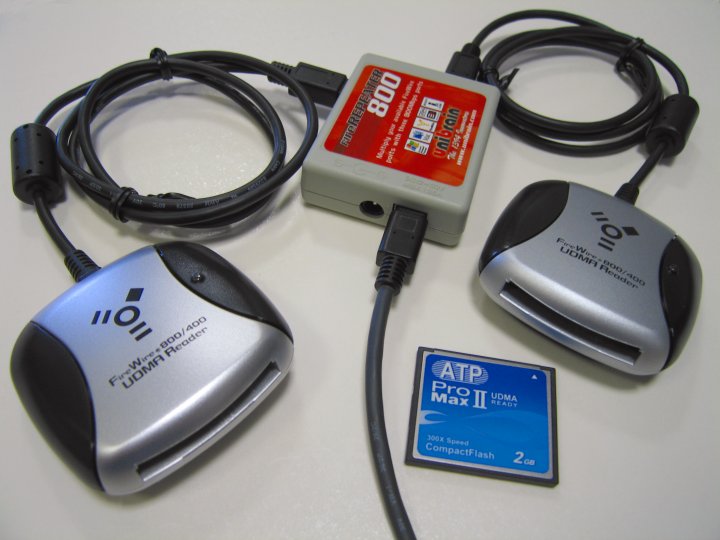
[1] A notible exception was the CFFire800 Pro FireWire 800 UDMA CompactFlash reader with Unibrain's 3 Port FireWire 800 Hub. We've tested this off a powered Mac port and were able to run two CFFire800 Pro's without the addtional power supply. Here is a quote from our test results.

While our CFFire800 Pro uses FireWire bus power, we knew it draws less than 500mA, while the MacBook Pro provides just under 1A of current while running on batteries. One product we offer, Unibrain's extremely portable FireRepeater 800, splits source current between two ports. With that in mind we set out to test two CFFire800 Pro readers with FireRepeater 800 to see if it provided enough power off a single FireWire 800 port to enable both CompactFlash readers; we found it worked flawlessly.

12VDC 3A External Power Supplies/Adapters for Unibrain FireWire Devices

This versatile adapter provides up to 3A stable regulated 12V DC output. For use with Unibrain Fire Repeaters, Fire-i Digital cameras and Unibrain FireWire External Hard Drives. It provides power for FireWire devices on laptops that do not provide power through the FireWire ports and can provide additional power for devices connected in an extended link to desktop systems.

Part Number and Description
PS-12VDC-UB 12VDC 3A External Power Supply/Adapter UB (FireWire)
PS-12VDC-UB-EUROPE 12VDC 3A External Power Supply/Adapter UB (FireWire) for European Type C/F outlets
Others available on special order, contact us with outlet type

Sunday, March 20, 2011

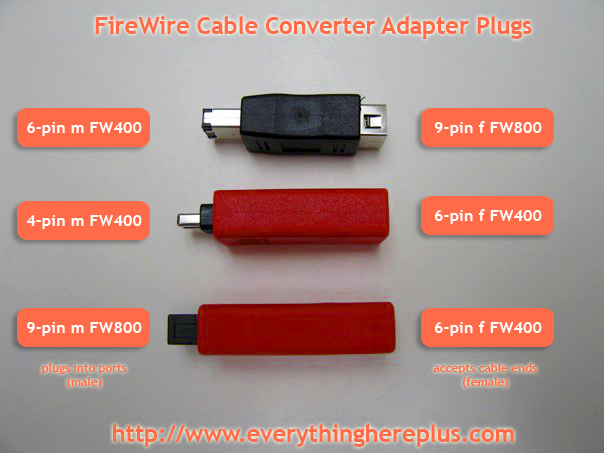
Clearly labeled photo explains FireWire Cable Converter Adapter Plugs

FireWire 800 (6 to 9 pin) (9 to 6 pin), and FireWire 400 (6 to 4 pin) Cable Converter and Adapter Plugs
How handy is this photo? It sure makes a lot of prose unnecessary. These adapters cover just about any FireWire 400 or FireWire 800 conversion scenario one could think of.

Converter plugs for FireWire cables allow changing the cable plug type at the very end to match that of the port it's being plugged into. For FireWire 400 (IEEE 1394a) ports, there are converter plugs allowing 9-pin cables to plug into 6-pin ports and converter plugs allowing 6-pin cables to plug into 4-pin ports. For FireWire 800 (IEEE 1394b) there is an adapter plug allowing 6-pin cables to plug into 9-pin ports.

Friday, September 10, 2010

5 Port FireRepeater-800 Pro FireWire 800 Repeater Hubs Ship for just $1.00 in September

FireRepeater-800 Pro 5 Port at EverythingHerePlus.comCheck out EverythingHerePlus.com's latest deal: $1.00 Priority Mail Flat Rate delivery to every address in the United States on the FW8-FIO-UB5PRH FireRepeater-800 Pro FireWire 800 IEEE 1394b Repeater Hub 5 Port. Purchase a power supply (PS-12VDC-UB or PS-12VDC-UB-EUROPE) at the same time, and both items ship in the same box for the same price — EverythingHerePlus.com will subtract power supply shipping at time of order processing. For international orders or shipping other than USPS Priority Mail, they'll apply a $4.00 USD discount to quoted shipping prices. This offer is only available on USPS Priority Mail Flat Rate Small Boxes shipping to United States destinations. Offer expires Midnight, September 30, 2010.

Monday, September 6, 2010

FireRepeater resources

FireRepeater-800 Pro FireWire 800 IEEE 1394b Repeater Hub 4 PortThe folks at EverythingHerePlus have been busy as of late. One of the more important piece they've put together is Power Supply Information for FireWire Repeater Hubs like Unibrain's FireRepeater Line, which takes all the mystery out of when and why one would need a power supply for a FireWire repeater hub. The information is especially valuable for those using FireRepeater-800 PRO and FireRepeater-400 products.

Along with that, they make brief mention in Store News for EverythingHerePlus.com: FireRepeater-800 PRO gets a glowing review from IT Enquirer, of an excellent review which discusses the FireRepeater-800 PRO Four Port. An excerpt:

In contrast to its competitors, Unibrain’s FireRepeater-800 PRO has a wall mounting bracket to secure the unit in place, and the ability to screw-lock your FireWire cables in place. I would recommend the Unibrain FireRepeater-800 PRO to anyone wanting to connect more devices to his computer than he can daisy-chain, and up to a longer distance than is possible without a repeater device.

Given their breadth of FireWire knowledge and glowing customer reviews, you'd be hard pressed to find a better place to purchase FireWire products.

Wednesday, February 10, 2010

FireWire 800 to FireWire 400 Cable Tip

Did you know FireWire 6-pin to 9-pin cables are the same as FireWire 9-pin to 6-pin cables? You simply flip the cable!

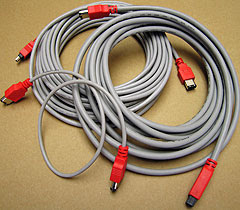
FireWire CablesUsing FireWire 800 and FireWire 400 Cable Converters and Adapter Plugs like the CAB-FW8-6-9-CONV and the CAB-FW8-9-6-CONV for existing cables is an inexpensive solution. However, the best solution in terms of electrical and signal shielding for bridging between 6 pin FireWire 400 Ports and 9 pin FireWire 800 ports is a 6-pin to 9-pin FireWire cable. EverythingHerePlus carries 2M (6.6F), 4.5M (14.8F), 10M (32.8F) versions of FireWire 6-pin to 9-pin cables.

Check out the full range of FireWire 800 Cables and FireWire 400 Cables at EverythingHerePlus.com in the shopping cart section on any of their FireWire Product Pages.

Saturday, January 2, 2010

FireWire 800 Hubs for New iMacs and Macs as easy as 3, 4, 5!

EverythingHerePlus.com offers 3, 4, and 5 port FireWire 800 Repeater Hubs.The recent transition to 9-pin FireWire 800 across Apple's product line has many people scrambling to find FireWire 800 hubs. Not to worry, EverythingHerePlus.com offers 3, 4, and 5 port FireWire 800 Repeater Hubs. Great for new Macs, iMacs, and other computing environments utilizing high performance FireWire 800 peripherals.

FireWire 800's sustained performance, coupled with other advantages like long cable runs, the ability to daisy chain, and more, make it one of the best and most versatile standards. With a theoretical maximum throughput of 800Mbps, FireWire 800—also known as IEEE 1394b, can typically deliver 80MBps (megabytes per second) performance when used with high end external hard drives like those by G|Tech.

FireWire is a true peer-to-peer technology, unlike the prosaic USB standard. Connectivity terminology for FireWire 800 Repeater Hubs is a little different than those that use star topologies exclusively. The count on a FireWire 800 Repeater Hub comprises the total available ports, since a host computer is considered another peer level device. In other words, plugging a computer into a five port FireWire 800 Repeater Hub leaves four available ports left.

These five, four, and three port FireWire 800 hubs are great for the new Mac Pro, MacBook Pro, iMac and other computers deploying FireWire 800. The 3 port FireWire 800 Repeater Hub edition is a highly portable plastic model, great for traveling. The 4 port and 5 port FireWire 800 Repeater Hub models are constructed from sturdy aluminum and are great for studio and industrial applications. All three FireWire 800 Repeater Hubs accept the optional (purchased separately) PS-12VDC-UB 12VDC 3A External Power Supply to power devices that run off bus power.

Using 6-pin to 9-pin cables or FireWire cable adapters allow FireWire 800 hubs to work with FireWire 400 device of both the 6-pin and 4-pin variety. In fact, since FireWire 800 is backward compatible, investing in a FireWire 800 Repeater Hub for use in mixed FireWire 800 and FireWire 400 environments is the higher performance, and more economical choice.

5 Port FireWire 800 Repeater Hub at EverythingHerePlus.com
Unibrain FireRepeater-800 Pro FireWire 800 IEEE 1394b Repeater Hub 5 Port
2504 / FW8-FIO-UB5PRH Available with $5 USPS Priority Mail shipping!

4 Port FireWire 800 Repeater Hub at EverythingHerePlus.com
Unibrain FireRepeater-800 Pro FireWire 800 IEEE 1394b Repeater Hub 4 Port
2502 / FW8-FIO-UB4PRH Available with $5 USPS Priority Mail shipping!

3 Port FireWire 800 Repeater Hub at EverythingHerePlus.com
Unibrain FireRepeater 800 FireWire 800 IEEE 1394b Repeater Hub 3 Port
2501 / FW8-FIO-UB3PRH Available with $5 USPS Priority Mail shipping!

EverythingHerePlus.com is fun place to shop for fashion accessories, electronics, books, music, and more!

Friday, December 11, 2009

FireWire 4 to 6-pin Cable with Gold Plated Connectors, DV quality at big box prices

 FireWire 400 4 to 6pin Cable 1.8M/6F with Gold Plated Connectors at EverythingHerePlus.comBafo's Premium line of FireWire cables feature ultra high density, triple shielded, high intensity copper for the most stabilized impedance and the highest digital video signal transfer available. Like all the premium line, this FireWire 4 to 6pin Cable has 24K pure hardened gold plated contacts to maintain high bandwidth and maximum data signal integrity. Bafo Premium line quality and standards compliance rival those of far more expensive cables. This 6-pin to 4-pin FireWire 400 cable is perfect for use with DV Camcorders featuring mini-DV, iLINK, FireWire 400 connectors. 1.8M (6 foot) is the most frequently requested length. The FireWire 4 to 6pin Cable is made with lead-free, RoHS compliant, and environmentally safe materials for a better world.

Available at EverythingHerePlus.com for just $5.00 with $5.00 USPS Priority Mail shipping.

Tuesday, December 1, 2009

FireRepeater-800 PRO 5 Port FireWire 800 Repeater Hub

FireRepeater-800 Pro 5 Port at EverythingHerePlus.comUnibrain's FireRepeater-800 PRO 5 Port Repeater Hub provides port expansion on FireWire 800 IEEE 1394b device chains. Oriented towards industrial and machine vision applications, FireRepeater-800 PRO provides the ability to connect up to five FireWire 800 devices and it's metallic compact case minimizes the risk of physical damage. The platform agnostic device provides five bilingual 9 pin FireWire 800 ports with a maximum throughput of up to 800 Mbps each. The Hub utilizes FireWire 800 bus power, or accepts an optional power adapter for use with devices requiring more power. The FireRepeater-800 PRO enables bus flexibility in that it allow for daisy chaining and/or hierarchical (tree) bus configurations. The FireRepeater-800 PRO also provides a means to lengthen the distance between devices when a single FireWire cable's length is inadequate. Simply daisy chain repeaters between cables to extend your reach. FireRepeater-800 PRO incorporates locking capable 9 pin bilingual ports, multiple mounting points and an optional metal bracket to ensure an even more secure physical connection.

Available at EverythingHerePlus.com at low prices with USPS Priority Mail shipping.

Friday, October 30, 2009

Announcing EverythingHerePlus.com

EverythingHerePlus.comEverythingHerePlus.com is a new online shop that, among other things, is an authorized Synchrotech reseller.

Their prices on many of Synchrotech's most popular items are typically discounted, and they ship via USPS Priority mail instead of FedEx, so many items are much cheaper to purchase when shipping is taken into account. For example EverythingHerePlus.com sells and ships the ExpressAdapt PCMCIA PC CardBus to USB Mode ExpressCard Adapter for $27.92. Or have an Unibrain FireWire 400 to 800 Adapter delivered for less the the retail price of the Sonnet version.

Tuesday, July 28, 2009

CFFire800 Pro Benchmarks and Performance Shootouts

CFFire800 with Adapter from EverythingHerePlus.comThe CFFire800 Pro FireWire 800 to UDMA CompactFlash reader made the arduous task off offloading photos from my Cannon S-70 somewhat of a joy. Synchrotech published a few documents verifying my experience.

CFFire800 Pro Benchmarks
I use an ATP ProMax II CF 300X UDMA CompactFlash Card and see numbers very close to the top cards on this list.

Modern UDMA CompactFlash Reader Benchmarks FireWire vs USB 2.0
I use the FireWire 800 based CFFire800 Pro in FireWire 400 mode with a 9→6 pin adapter and can say it outperforms any USB 2.0 based CompactFlash reader I've ever tested by orders of magnitude.

Wednesday, July 8, 2009

Jeff Cat Explains FireWire Port Identification

CES 2009: USB 3.0 slower than expected

Any wonder at all the latest incarnation of the prosaic USB standard with its outdated and awkward master-slave topology, underperforming NRZI encoding, and clumsy CPU cycle stealing bus mastering scheme doesn't live up to the hype?

Evidenced by the results of all the benchmarks I've ever run in the lab, USB 2.0 is crushed by Ultra Wide SCSI, an early 1990's technology. Let's ponder USB with its anemic power capabilities, frightfully short cable runs, and well over a decade old performance capabilities. What was USB's advantages other than ubiquity again?

I realize many USB otaku have bought into the Intel fanboi TV spot [1], but maybe people should be tossing rotten fruits and vegetables at Ajay Bhatt.

[1] Truth is, Intel was only one many firms with patents contributed to the original USB pool. Intel later bought many of them after the fact. So the whole "rock star inventor" thing is a little suspect no? In fact, Wikipedia cites him as one of the co-inventors. http://en.wikipedia.org/wiki/Universal_Serial_Bus#History

Thursday, October 2, 2008

A pro reader for the rest of us

CFFire800 with Adapter from EverythingHerePlus.comWhen EverythingHerePlus.com released their CFFire800 Pro reader for CompactFlash cards, I was waiting for them to add a FireWire 400 option. Since I switched from my Pismo PowerBook to an iMac G5, I have had to download photos to iPhoto over the Canon S70's slow USB connection. I have been waiting for an affordable FireWire reader ever since. EverythingHerePlus.com's CFFire800 Pro FireWire 800 to CompactFlash Drive Read-Writer has a 9-pin FireWire 800 plug and I couldn't find a converter plug. Now EverythingHerePlus.com is offering such a plug for those of us that need to use the lightning fast reader with FireWire 400. Their FireWire 800 9pin (female) to 6pin (male) Converter Plug allows use of the CFFire800 Pro for the rest of us. From everything I have read, and my own testing so far, this reader is much faster than USB 2.0 models even when used over FireWire 400 (IEEE 1394a) mode.